


Introduction
Aggregating text data is an essential task for any engineer.
Especially when dealing with logs or numerical data, there are many situations where you need to find a "total" quickly.
This is where the awk command shines. With awk, you can perform efficient summation using simple syntax without writing complex programs.
In this article, we will carefully explain everything from basic summation to advanced usage so that even awk beginners can understand it.
We also cover common pitfalls, so let’s deepen your understanding through practice.
Reference: GNU awk
Basic Structure: Summing the Second Column
The basic command we will use is:
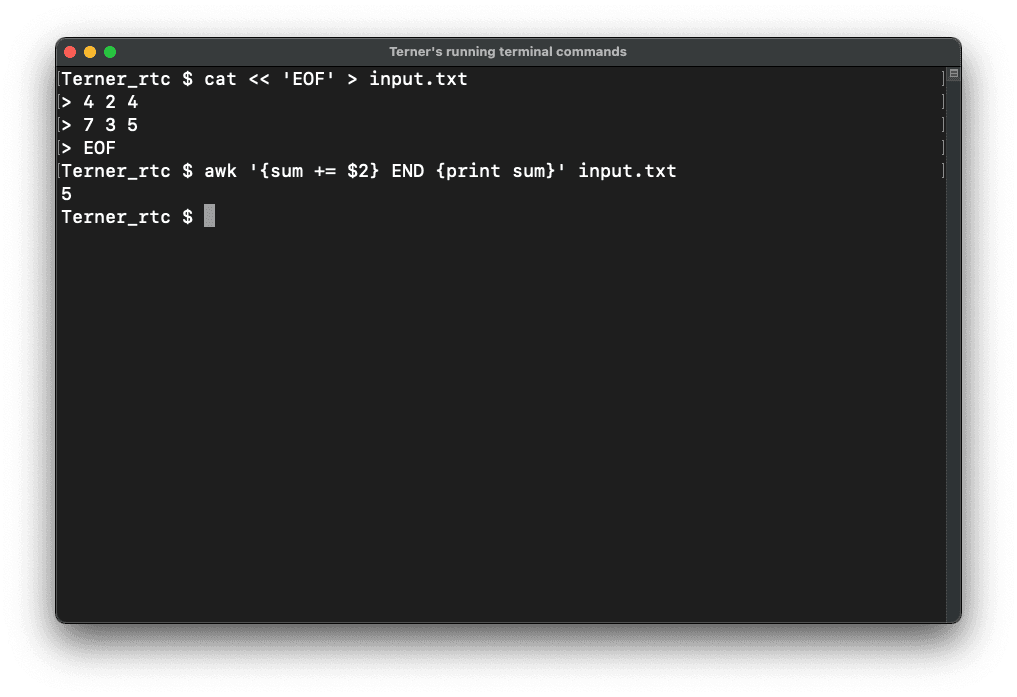
awk '{sum += $2} END {print sum}' input.txtThis command performs the process of "adding up the values in the second column sequentially and printing the final total."
| $2 | Retrieves the value of the second column. |
| sum += $2 | Adds the value to the variable sum. |
| END {print sum} | Outputs the total after all lines have been processed. |
In awk, the fundamental flow is to accumulate values while processing the file line by line.
Input State(input.txt)
4 2 4
7 3 5
Here, three columns of numerical values are arranged, separated by spaces.
Execution Result
5The values "2" and "3" from the second column are summed, resulting in "5".
Execution image
Summing All Columns
Command
awk '{for(i=1; i<=NF; i++) sum[i] += $i} END {for(i=1; i<=NF; i++){ printf "sum%d:%d ", i, sum[i]} printf "\n"}' input.txtHow it works
| NF | The number of fields (columns) in the current line. |
| for(i=1; i<=NF; i++) | Loops through all columns. |
| sum[i] += $i | Manages the total for each column using an array. |
This command calculates the total for each individual column.
Output:
sum1:11 sum2:5 sum3:9Summing by Row
Command:
awk '{ sum = 0; for(i=1; i<=NF; i++) sum += $i } { printf "sum:%d\n", sum }' input.txtHow it works
| Resets sum for every line. |
| Loops through each column and adds them up. |
| Outputs the total on a per-line basis. |
Output Example
sum:10
sum:15
Specific Use Cases
1. Aggregating CSV Files (input.csv)
awk -F, '{for(i=1; i<=NF; i++) sum[i] += $i} END {for(i=1; i<=NF; i++){ printf "sum%d:%d ", i, sum[i]} printf "\n"}' input.csvMechanism
| -F, to change the delimiter to a comma |
| Enabling column summation for CSV formats. |
2. Summing Response Sizes in Apache Logs (access_log)
Example:access_log
127.0.0.1 - - [date] "GET /index.html HTTP/1.1" 200 512
127.0.0.1 - - [date] "GET /img.png HTTP/1.1" 404 256
127.0.0.1 - - [date] "GET /home HTTP/1.1" 200 1024
Command
awk '{for(i=1;i<=NF;i++) if($i == "200") sum += $(i+1)} END {printf "response size sum: %d\n", sum }' 'access_log'Mechanism
| Detects the status code "200" |
| Add the value of the field immediately following it (the response size). |
3. Summing Floating Point Numbers
awk '{sum += $1} END {printf "sum: %.2f\n", sum}' input.txtMechanism
| Accurately sums values including decimals. |
| %.2f formats the output to two decimal places. |
Common Mistakes
1. Incorrect Column Specification
If you specify $3 instead of $2, you will get an unintended total.
2. Forgetting the Delimiter
If you don't specify -F, for a CSV file, the columns will not be split correctly.
3. Forgetting to Reset sum
In row-based summation, if you forget sum = 0, the values from the previous row will carry over and accumulate.
Conclusion
Summation using awk is simple yet incredibly powerful.
Once you understand the basics, your efficiency in log analysis and data processing will improve significantly.
Start by trying out these commands and gradually step up to more advanced applications!

