


Introduction
While sed is an essential command for text processing, many beginners struggle with the concept of "delimiters." Specifically, when dealing with strings like file paths that contain many slashes (/), the need for escaping increases, making the code difficult to read.
While / is most commonly used, you can actually change it freely. The first character immediately following the s command is recognized as the delimiter. Besides /, characters such as |, #, @, and ; are frequently used.
In this article, we will explain the mechanics of delimiters and how to choose between them from a beginner's perspective.
Reference: GNU sed
Understanding the Substitution Command through sed and Delimiters
We will use the following command for this explanation:
sed 's|/|_|g' input.txtThe role of this command is to "replace all instances of / with _".
How it Works
| Element | Description |
|---|---|
| s | Initiates the replacement |
| | | Delimiter |
| / | The string to be replaced |
| _ | The new string |
| g | Replaces all occurrences in the line |
Virtually any character (except for newlines or backslashes) that immediately follows the s command can be used as a delimiter.
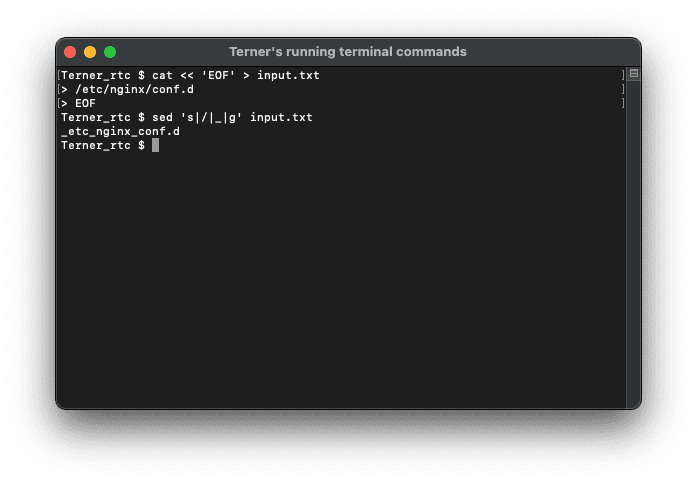
Before Execution
File name: input.txt
/etc/nginx/conf.dAfter Execution
File name: input.txt
_etc_nginx_conf.dExecution image
Comparing Code: | vs /
| Delimiter | Code Example | Features |
|---|---|---|
| / | sed 's/\//_/g' input.txt | Requires escaping the / |
| | | sed 's|/|_|g' input.txt | No requires escaping the / |
The key advantage is that by reducing escapes (), you can physically prevent errors in your regular expressions.
Using Other Delimiters
| Delimiter | Code Example | Features |
|---|---|---|
| # | sed 's#/#_#g' input.txt | Useful for URLs |
| @ | sed 's@/@_@g' input.txt | High visibility |
| ; | sed 's;/;_;g' input.txt | Simple |
Cases Where You Should NOT Change It
- When you want to match general sample code.
- In scripts shared with others.
- For simple substitutions with few escapes.
In these scenarios, using the standard / is often easier for others to understand.
Delimiter Reference Table
| Use Case | Recommended Delimiter | Reason |
|---|---|---|
| File Paths | | | Does not conflict with / |
| URL | # | Does not conflict with http:// |
| Complex Regex | @ | Provides good visibility |
Concrete Usage Scenario
File name: input.txt
/etc/nginx/conf.dCommand
sed 's|/|_|g' input.txtExplanation
The path separator / is converted to _ to process the string into a safe format for logs or variables. By using | as the delimiter, it doesn't conflict with the / in the path, allowing processing without the need for escapes.
If the Delimiter is Included in the Text
Error Example:
sed 's|/|||g' input.txtThis is prone to misinterpretation because the "Replacement" is empty and the delimiters are consecutive.
Improved Example:
sed 's|/|\||g' input.txtIn this case, we are replacing / with |. By escaping with a backslash, the delimiter itself can be treated as a literal character.
Using Shell Variables
sed "s|/|$TEST|g" input.txtMechanism
- Using double quotes allows shell variables to expand.
- The / will be replaced by the value of $TEST.
Example:
TEST=-, then / is converted to -.
Common Failure Examples
1.
sed 's|h/_/'Syntax error due to missing delimiters.
2.
sed 's|/|_|' input.txtOnly the first occurrence is replaced because the g flag is missing.
3.
sed 's//_/g' input.txtError because the target to be replaced is not specified.
Summary
Understanding sed delimiters significantly improves code readability and safety. Especially when handling paths or URLs, choosing the appropriate delimiter is a crucial skill.


