


Introduction
Handling "newlines" is a frequent task in text processing. The sed command is a simple yet powerful tool for manipulating text, offering flexibility in inserting, deleting, and replacing newlines.
However, beginners often stumble over points such as "newlines not being inserted as expected" or "behavioral differences between BSD and GNU versions." In this article, we will provide an easy-to-understand explanation of how to handle newlines in sed using practical command examples.
Reference: GNU sed
Mechanism of Inserting a Newline at the Beginning with sed
We will use the following command:
sed '1i\
\
' input.txt
This command performs the process of inserting a blank line (newline) at the top of the file.
| Element | Description |
|---|---|
| 1 | Specifies the first line |
| i | Insert before the specified line |
| \ | Escape character to represent a newline |
| Blank line | The actual newline to be inserted |
| input.txt | The target file |
Note that in the BSD version of sed, it is necessary to write a physical newline after the backslash as shown above.
Before Execution
First, let's create a file:
cat << 'EOF' > input.txt
hello
world
EOF
The content of input.txt is:
hello
world
After Execution
Run the command:
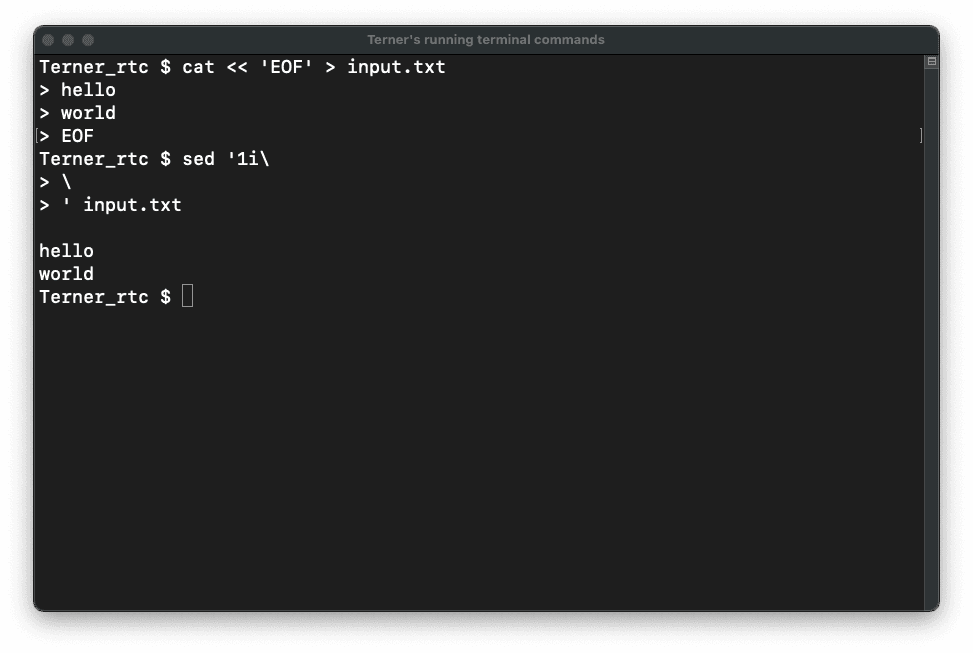
sed '1i\
\
' input.txt
The output is:
hello
world
You can confirm that one blank line (newline) has been added to the beginning.
Execution image
Differences in Behavior: GNU sed vs. BSD sed
In GNU sed, handling newlines is more concise. For example, adding a blank line can be written as:
sed '1i\'$'\n' input.txtOR
sed '1i\
' input.txt
The BSD version requires the "backslash + physical newline" format strictly, which is a common point of confusion.
Mechanism of Replacing Newlines with Spaces
Use the following command:
sed -e ':a' -e 'N' -e '$!ba' -e 's/\n/ /g' input.txtCommand Breakdown
| Element | Description |
|---|---|
| -e | Specifies multiple commands |
| :a | Defines label "a" |
| N | Appends the next line to the pattern space |
| $!ba | If it is not the last line, branch (go back) to label "a" |
| s/\n/ /g | Replace newlines with spaces globally |
Process Flow
- :a defines the start of a loop.
- N pulls the next line into the pattern space.
- $!ba combines all lines into one by looping until the end of the file.
- Finally, it replaces all newlines with spaces.
Why is this method necessary?
Normally, sed processes text line by line. Therefore, to target newlines, you must read all lines into the pattern space first.
Pattern Space and Hold Space
- Pattern Space: The data area currently being processed.
- Hold Space: A temporary storage area.
This specific process uses only the pattern space.
Converting Newlines to Spaces using the tr Command
The same result can be achieved with the tr command:
tr '\n' ' ' < input.txtWhile simpler, sed is better suited for more complex control logic.
Mechanism of Appending a Newline to the End
sed '$a\
\
' input.txt| Element | Description |
|---|---|
| $ | The last line |
| a | Append after the line |
| \ | Newline escape |
| Blank line | The actual newline |
How to Write Directly to a File (In-place Edit)
sed -i '' '1i\
\
' input.txt
In the BSD version, you must specify -i '' (an empty string after the flag).
How to Replace Specific Characters with Newlines
For example, converting commas to newlines:
sed 's/,/\n/g' input.txtNewlines are represented by a backslash + n (\n).
Understanding sed Newline Operations via Reverse Lookup
Example 1: Add a newline at the beginning
cat << 'EOF' > sample1.txt
a
b
EOF
sed '1i\
\
' sample1.txtExample 2: Delete newlines to make a single line
cat << 'EOF' > sample2.txt
a
b
EOF
sed -e ':a' -e 'N' -e '$!ba' -e 's/\n//g' sample2.txtExample 3: Convert commas to newlines
cat << 'EOF' > sample3.txt
a,b,c
EOF
sed 's/,/\n/g' sample3.txtCommon Failure Patterns in sed Newline Processing
1. Not writing a newline after the backslash
sed '1i\' input.txt→ The content of input.txt is displayed as is.
2. Incorrect -i option in BSD
sed -i '1i\
\
' input.txt
→ Two single quotes ('') are required after -i.
3. Writing the newline directly as \n in insertion
sed '1i\n' input.txt→ This results in an error.
Summary: Deepening Your Understanding
To master newlines in sed, it is crucial to understand the premise of "line-by-line processing." Particularly in the BSD version, you must be careful with the unique rules for writing newlines.
Once you can master the insertion, deletion, and replacement of newlines, your efficiency in log processing and data formatting will improve significantly. It is recommended to start with basic commands and gradually move toward more advanced applications.


